TUTORIAL DETAIL
Android Custom ROM Development Guide
A complete, step-by-step guide to building a custom Android ROM from source — covering everything from device trees to flashing a finished build.
Watch on YouTube: https://youtu.be/soon
Examples used throughout this guide: ROM source → Clover Project (Android 16) Target device → Xiaomi Redmi Note 13 Pro 5G (garnet) · Snapdragon 7s Gen 2
Table of Contents
- Why Custom ROM?
- Pros & Cons
- Custom ROM vs OEM ROM
- Custom ROM in 2026 — Still Worth It?
- Pre-Requirements
- Device Trees
- ROM Source
- Basic Bringup & Sync Source
- Lunch & Build
- Upload, Flash & Test
Why Custom ROM?
A Custom ROM is a fully customized version of the Android operating system, built independently from any device manufacturer's official firmware. Rooted in the open-source nature of Android (AOSP), custom ROMs give developers and power users complete control over their mobile experience — from the kernel level all the way to the UI.
Custom ROM projects follow the tradition of legendary builds like CyanogenMod, LineageOS, OmniROM, and AOKP — each targeting newer Android versions with a shared philosophy:
- AOSP purity — no unnecessary bloat on top of Android's foundation
- Stability first — each release tested before being tagged stable
- Meaningful features — only what genuinely improves the experience
- Long-term support — keeping devices alive beyond manufacturer EOL
For the Redmi Note 13 Pro 5G, which ships with Xiaomi's HyperOS (known for heavy telemetry, ads, and slow security patches), Clover offers a compelling and transparent alternative.
Why does this matter in 2026? OEM support cycles are shrinking. Xiaomi typically offers 3–4 years of OS updates. Custom ROMs can extend a device's life indefinitely as long as the community maintains it.
Pros & Cons
Advantages of Custom ROM
| Benefit | Description |
|---|---|
| No Bloatware | Clean AOSP base — zero pre-installed ads or manufacturer apps |
| Privacy | No OEM telemetry, fully auditable open-source code |
| Performance | Lighter system footprint, faster UI response |
| Root Access | Easy Magisk / KernelSU integration |
| Long-Term Support | Community may maintain device years past OEM EOL |
| Customization | Deep system-level theming, tweaks, and mods |
| Security Patches | Community often delivers patches faster than OEM |
| Google-Free Option | Compatible with microG for de-Googled experience |
| Open Source | Full source on GitHub — see exactly what runs on your phone |
| Learning | Best hands-on education for Android internals |
Disadvantages of Custom ROM
| Drawback | Description |
|---|---|
| Warranty Void | Bootloader unlock voids manufacturer warranty on most devices |
| Banking Apps | May require extra steps to pass Play Integrity / SafetyNet |
| Camera Quality | OEM camera AI stack often missing — photo quality degrades |
| VoLTE / VoWiFi | May break or require manual carrier configuration |
| DRM Widevine | Usually drops from L1 to L3 — Netflix/Prime lose HD playback |
| Stability Risk | You're a beta tester — bugs are expected |
| Brick Risk | Incorrect flashing can hard-brick the device |
| Technical Skill | Setup requires Linux knowledge, patience, and research |
| No Guaranteed OTA | Updates depend on maintainer availability |
Custom ROM vs OEM ROM
| Category | Clover Project (Custom) | HyperOS (OEM) |
|---|---|---|
| Software Updates | Community-driven, faster patches | Slow, Xiaomi-schedule dependent |
| Bloatware | None — clean AOSP | Heavy — built-in ads & Xiaomi apps |
| Privacy / Telemetry | Fully transparent, auditable | Extensive data collection |
| Camera Performance | Basic AOSP camera | Full Xiaomi AI camera stack |
| Banking Apps | Works with Play Integrity fix | Works out of the box |
| Stability | Varies by maintainer | Generally stable |
| Customization | Deep system-level control | Surface-level themes only |
| Performance | Snappier (less overhead) | Good but heavier |
| Battery Life | Better (fewer background services) | Decent with battery saver |
| VoLTE / VoWiFi | May need manual config | Native support |
| Root Access | Easy (Magisk / KernelSU) | Not officially supported |
| Widevine L1 | Drops to L3 | L1 preserved |
| Long-Term Support | Community extends beyond EOL | 3–4 years, then abandoned |
| Source Code | Fully open on GitHub | Closed proprietary firmware |
Custom ROM in 2026 — Still Worth It?
The custom ROM scene in 2026 has matured but also grown more challenging. Here's the honest breakdown:
Yes — For Developers
If your goal is to understand Android deeply, contribute to open source, or build for a specific use case, custom ROM development is absolutely worthwhile. The learning experience — kernel porting, HAL integration, SELinux policies, AIDL/HIDL — is irreplaceable.
Maybe — For Power Users
If you want a clean, fast, private daily driver and can tolerate camera and banking workarounds — yes. Research the specific device maintainer's track record before committing.
No — For General Users
If you rely on mobile banking, OEM camera features, or simply want things to work without maintenance — stick with the stock ROM. Custom ROMs require technical tolerance and ongoing attention.
2026 Verdict: The tooling ecosystem is healthier than ever (Docker build environments, Android Common Kernel, lineageos-build-scripts). However, Qualcomm's proprietary blobs, Google's Play Integrity API, and increasingly complex camera stacks make shipping a fully competitive daily driver harder than the CyanogenMod era. Clover's bet on AOSP purity over feature bloat is the right philosophy for 2026.
Pre-Requirements
Hardware Requirements
| Component | Minimum | Recommended |
|---|---|---|
| CPU | 4 cores | 12–16 cores |
| RAM | 16 GB | 32–64 GB |
| Storage | 300 GB SSD | 500 GB+ NVMe SSD |
| OS | Ubuntu | Ubuntu 22.04 / 24.04 |
| Internet | 50 Mbps | 100+ Mbps |
| Build Time | — | 1–3 hrs (first), ~30 min (incremental) |
System Setup
# Install all build dependencies (Ubuntu 22.04 / 24.04)
sudo apt update && sudo apt install -y \
  bc bison build-essential ccache curl flex g++-multilib gcc-multilib \
  git git-lfs gnupg gperf imagemagick lib32ncurses5-dev lib32readline-dev \
  lib32z1-dev liblz4-tool libncurses5 libncurses5-dev libsdl1.2-dev \
  libssl-dev libxml2 libxml2-utils lzop pngcrush rsync schedtool \
  squashfs-tools xsltproc zip zlib1g-dev python3 python3-pip \
  openjdk-21-jdk

# Install the repo tool
mkdir -p ~/bin
curl https://storage.googleapis.com/git-repo-downloads/repo > ~/bin/repo
chmod a+x ~/bin/repo
echo 'export PATH=~/bin:$PATH' >> ~/.bashrc && source ~/.bashrc

# Configure git (required by repo)
git config --global user.email "you@example.com"
git config --global user.name "Your Name"

# Setup ccache for significantly faster rebuilds
export USE_CCACHE=1
export CCACHE_EXEC=$(which ccache)
ccache -M 50G
echo 'export USE_CCACHE=1' >> ~/.bashrc
Knowledge Prerequisites
Before starting, you should be comfortable with:
- Linux CLI — bash, permissions, scripting,
make,grep, pipes - Git & Repo — manifests, local manifests, cherry-picks, branch management
- Android Architecture — kernel, HAL, Binder IPC, system services, framework
- Build System — reading and writing
Android.bp(Soong) andAndroid.mkfiles - SELinux — understanding type enforcement, file contexts, and neverallow rules
Device Prerequisites
Bootloader Unlock (Required)
Device Trees
Device trees are the bridge between generic AOSP source and your specific hardware. For example garnet, you need three repositories working together:
Tree Types
General for all device
| Tree | Path | Purpose |
|---|---|---|
| Device Tree | device/xiaomi/garnet | Init scripts, SELinux, overlays, build configs, prop flags |
| Kernel | kernel/xiaomi/sm7435 | Linux kernel source for Snapdragon 7s Gen 2 |
| Vendor | vendor/xiaomi/garnet | Proprietary blobs — camera HAL, modem firmware, Qualcomm DSP |
| Hardware Xiaomi | hardware/xiaomi | Xiaomi-specific HIDL/AIDL hardware interface implementations |
Other trees
| Tree | Path | Purpose |
|---|---|---|
| Device Common | device/xiaomi/sm7435-common | Shared SoC-level configs across all SM7435 devices |
| Kernel Modules | kernel/xiaomi/sm7435-modules | Out-of-tree kernel drivers (Wi-Fi, audio, sensors) |
| Kernel Device Trees | kernel/xiaomi/sm7435-devicetrees | DTS/DTSI files for SM7435 board and device variants |
| Vendor Common | vendor/xiaomi/sm7435-common | Shared vendor blobs across all SM7435 devices |
| Hardware Dolby | hardware/dolby | Dolby Atmos audio HAL and sound configuration |
| MIUI Camera App | vendor/xiaomi/miuicamera-garnet | Pre-built MIUI/Leica camera APK and supporting libraries |
| MIUI Camera Config | device/xiaomi/miuicamera-garnet | Camera integration configs, overlays and permissions |
Note: The tree paths, names, and structure below are specific to Xiaomi Redmi Note 13 Pro 5G (
garnet) used as an example in this guide. For other brands and devices, the paths, codenames, SoC identifiers, and repository names will vary accordingly — e.g.device/oneplus/kebab,kernel/samsung/exynos9820,vendor/google/pixeletc.
Device Tree File Structure
device/xiaomi/garnet/
├── Android.bp                  # Build system entry point
├── AndroidProducts.mk          # Product definition (lunch targets)
├── BoardConfig.mk              # Hardware-level build flags ← critical
├── device.mk                   # Main Makefile (packages, props, features)
├── clover_garnet.mk            # ROM-specific product config
├── audio/                      # Audio policy XMLs
├── configs/
│   ├── media_codecs.xml
│   ├── media_profiles.xml
│   ├── manifest.xml            # VINTF hardware manifest
│   └── thermal-engine.conf
├── display/                    # Display AIDL configs
├── init/
│   ├── init.garnet.rc          # Device init scripts ← critical
│   └── init.target.rc
├── overlay/                    # Resource overlays (strings, configs)
├── rootdir/etc/
│   ├── fstab.qcom              # Partition mount table ← critical
│   └── ueventd.rc
├── sepolicy/                   # SELinux policies
│   ├── vendor/
│   └── private/
└── proprietary-files.txt       # List of blobs to extract from stock
Key BoardConfig.mk Settings for garnet
# Platform
BOARD_VENDOR                    := xiaomi
TARGET_BOARD_PLATFORM           := pineapple
TARGET_ARCH                     := arm64
TARGET_ARCH_VARIANT             := armv8-2a-dotprod
TARGET_CPU_ABI                  := arm64-v8a
TARGET_CPU_VARIANT              := cortex-a78

# Kernel
BOARD_KERNEL_BASE               := 0x00000000
BOARD_KERNEL_PAGESIZE           := 4096
TARGET_KERNEL_CONFIG            := garnet_defconfig
TARGET_KERNEL_SOURCE            := kernel/xiaomi/sm7435
BOARD_KERNEL_IMAGE_NAME         := Image

# Dynamic Partitions (garnet uses super partition)
BOARD_SUPER_PARTITION_SIZE                := 9653190656
BOARD_SUPER_PARTITION_GROUPS              := qti_dynamic_partitions
BOARD_QTI_DYNAMIC_PARTITIONS_SIZE         := 9649094656
BOARD_QTI_DYNAMIC_PARTITIONS_PARTITION_LIST := system system_ext product vendor odm

# VINTF
DEVICE_MANIFEST_FILE            := device/xiaomi/garnet/configs/manifest.xml
DEVICE_MATRIX_FILE              := device/xiaomi/garnet/configs/compatibility_matrix.xml
Extracting Vendor Blobs
# Method 1: Extract live from a running stock device via ADB
cd device/xiaomi/garnet
./extract-files.sh

# Method 2: Extract from a stock ROM dump
# Download fastboot ROM → unpack with payload-dumper-go
payload-dumper-go payload.bin
simg2img system.img system.raw
mkdir -p /mnt/system && sudo mount -o loop system.raw /mnt/system

# Method 3: Use a community blob archive
git clone  \
    vendor/xiaomi/garnet
Blob version must match your target stock ROM version exactly. Mismatched blobs cause bootloops, camera crashes, and modem failures.
ROM Source (example - clover project)
The Clover Project source is hosted on GitHub and uses Google's repo manifest system to track hundreds of repositories that together form the complete Android build system.
Basic Bringup & Sync Source
A full sync is approximately 150–300 GB. Use a wired connection and plan for 2–5 hours.
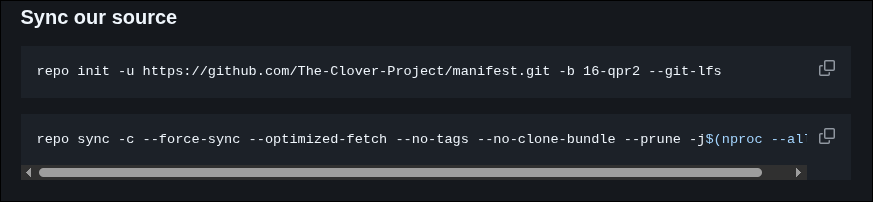
Initialize & Sync
# Create your build directory
mkdir -p ~/android/clover-16 && cd ~/android/clover-16

# Initialize the repo manifest
repo init \
  -u https://github.com/CloverProject/android.git \
  -b android-16.0 \
  --depth=1 \
  --git-lfs

# Sync all sources — adjust -j to your thread count
repo sync -c -j16 --force-sync --no-clone-bundle --no-tags
If a repo fails mid-sync, simply run
repo syncagain — it resumes from where it stopped.
Bringup
Clone all the required repositories using Git.
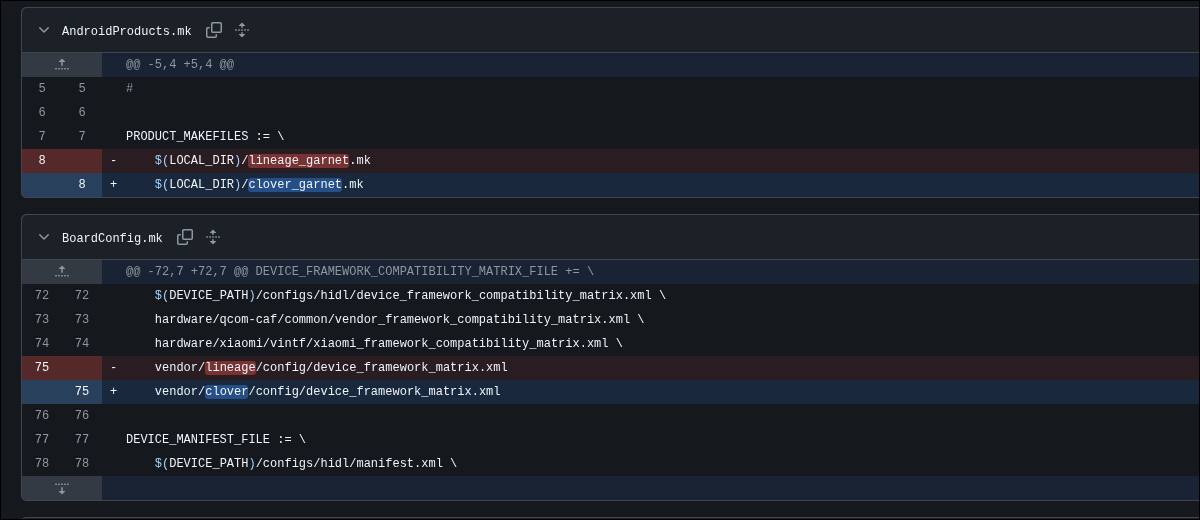
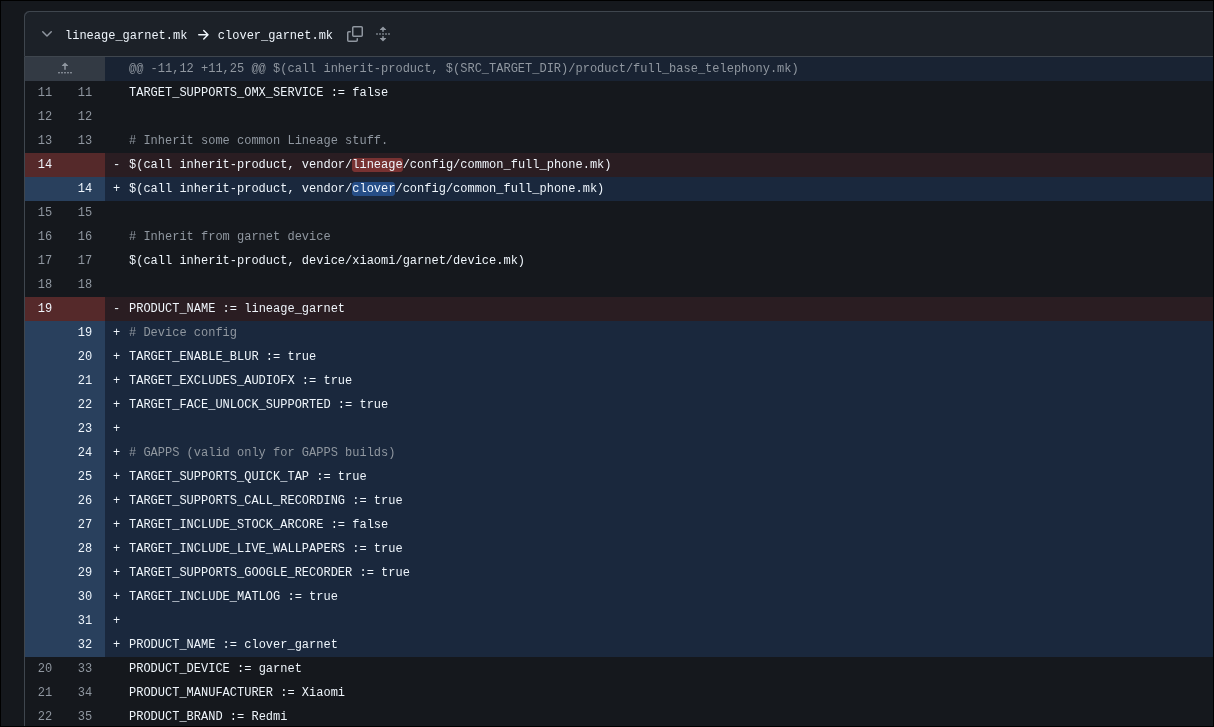
Step 1 — Adapt the device tree
# If porting from a LineageOS base tree, rename product targets
sed -i 's/lineage_garnet/clover_garnet/g' device/xiaomi/garnet/*.mk
sed -i 's/PRODUCT_NAME := lineage/PRODUCT_NAME := clover/g' device/xiaomi/garnet/*.mk
Step 2 — Verify partition layout
Run fastboot getvar all on the device and compare super partition sizes against your BoardConfig.mk. Garnet uses Dynamic Partitions — this must be correct or fastboot flashing will fail.
Step 3 — Confirm vendor blobs are in place
ls vendor/xiaomi/garnet/proprietary/
# Expected: lib/  lib64/  bin/  etc/  firmware/
Step 4 — Initial SELinux handling
For first bringup, add this to your BoardConfig.mk to bypass SELinux neverallow failures:
SELINUX_IGNORE_NEVERALLOWS := true
Fix SELinux policies properly before any public release.
Lunch & Build
Initialize Build Environment
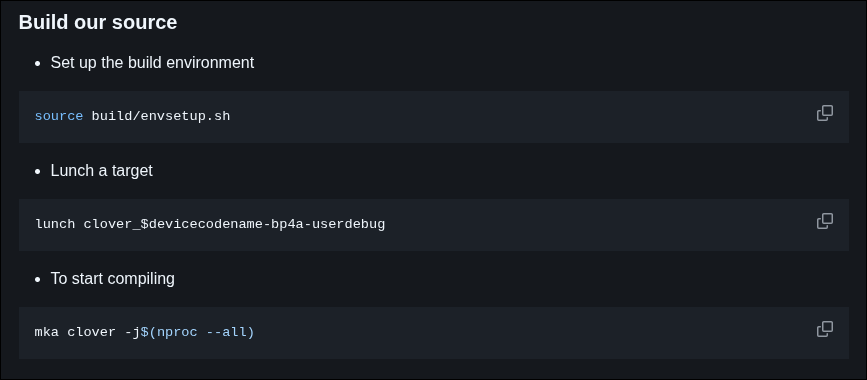
cd ~/android/clover-16

# Source the build environment
source build/envsetup.sh

# Select your build target
# Format: lunch {product_name}-{buildtype}
# Buildtypes: user (release) | userdebug (root+debug) | eng (full debug)
lunch clover_garnet-userdebug
Expected output:
============================================
PLATFORM_VERSION_CODENAME=REL
PLATFORM_VERSION=16
TARGET_PRODUCT=clover_garnet
TARGET_BUILD_VARIANT=userdebug
TARGET_BUILD_TYPE=release
TARGET_ARCH=arm64
HOST_ARCH=x86_64
============================================
Build the ROM
# Full build — use all CPU threads
m -j$(nproc)

# Or use the ROM's own build script
mka clover -j$(nproc --all)
Build Outputs
out/target/product/garnet/
├── clover_garnet-ota-YYYYMMDD-garnet.zip  ← Your flashable ROM package
├── boot.img                                ← Kernel + ramdisk
├── recovery.img                            ← Recovery image
├── vendor_boot.img                         ← Vendor ramdisk (GKI)
├── dtbo.img                                ← Device Tree Blob Overlay
├── system.img                              ← System partition
├── vendor.img                              ← Vendor partition
└── super.img                               ← Combined dynamic partitions
Common Build Errors
| Error | Likely Cause | Fix |
|---|---|---|
ninja: 'out/.../obj/...' missing | Missing blob or broken Android.bp | Check proprietary-files.txt and vendor tree |
ld.lld: undefined symbol | Library not listed in vendor or device tree | Add missing .so to Android.bp or device tree |
No rule to make target | Module name mismatch | Check LOCAL_PACKAGE_NAME in Android.mk |
FAILED: out/.../sepolicy | SELinux neverallow violation | Fix policy or use SELINUX_IGNORE_NEVERALLOWS |
error: unsatisfied requirement | VINTF manifest mismatch | Update manifest.xml or compatibility_matrix.xml |
Upload, Flash & Test
Flashing via Custom Recovery (TWRP / OrangeFox)
# 1. Boot to bootloader
adb reboot bootloader

# 2. Flash recovery
fastboot flash recovery recovery.img
fastboot reboot recovery

# 3. In recovery: Wipe → Format Data
# 4. Push ROM ZIP and flash
adb push out/target/product/garnet/clover_garnet-ota-*.zip /sdcard/
# Then in TWRP: Install → select ZIP → Swipe to Flash
Flashing via Fastboot (partition-by-partition)
adb reboot bootloader

# Flash A/B-agnostic partitions
fastboot flash boot boot.img
fastboot flash vendor_boot vendor_boot.img
fastboot flash dtbo dtbo.img

# Switch to fastbootd for dynamic partitions
fastboot -w reboot fastboot

# Flash dynamic partitions
fastboot flash system system.img
fastboot flash vendor vendor.img
fastboot flash product product.img
fastboot flash system_ext system_ext.img

fastboot reboot
Debugging a Bootloop
# Capture logcat during bootloop
adb logcat | grep -E "(FATAL|ERROR|crash|tombstone)" | tee crash.log

# Check battery stats for wakelock drain
adb shell dumpsys batterystats | grep "Wake lock"

# Check SELinux denials
adb shell dmesg | grep -i "avc: denied"

# Check init failures
adb logcat -b all | grep -i "failed\|error\|crash" | head -100
Device Info
| Attribute | Value |
|---|---|
| Device Name | Xiaomi Redmi Note 13 Pro 5G |
| Codename | garnet |
| SoC | Qualcomm Snapdragon 7s Gen 2 (SM7435) |
| Architecture | ARM64 (armv8-2a-dotprod) |
| RAM | 8 / 12 GB LPDDR4X |
| Storage | 128 / 256 GB UFS 2.2 |
| Display | 6.67" AMOLED, 120Hz, 2712×1220 |
| Camera (Main) | 200 MP, OIS |
| Battery | 5100 mAh, 67W fast charge |
| Android Version | Android 16 (Clover Project) |
| Partition Scheme | Dynamic Partitions (Super) |
| Kernel | Linux 5.15.x GKI |
Disclaimer
This guide is for educational and development purposes only. Flashing custom software carries inherent risks including data loss, bootloops, and hardware damage. The authors are not responsible for any damage to your device. Always backup your data before modifying your device. Proceed at your own risk.
Flash responsibly. Contribute openly. Keep devices alive.